

Canceling vs. Replacing Open Orders: Key Differences
Compare canceling vs replacing open options orders—risks, timing, queue impact and best practices to avoid unintended fills.
When managing open orders in options trading, you have two primary choices: canceling or replacing. Canceling removes your order completely, while replacing allows you to modify the price or quantity without abandoning the trade. Each approach has unique risks, timing considerations, and impacts on execution.
Key Points:
- Canceling stops the trade entirely, useful when market conditions change or the trade no longer aligns with your strategy.
- Replacing lets you adjust the order's terms (e.g., price or quantity) while keeping your intent to trade intact.
- Both actions involve delays (50–300 milliseconds), with canceling being faster but replacing offering flexibility.
- Timing, order type (limit, stop, etc.), and market conditions play a big role in deciding which option to use.
Quick Comparison:
| Factor | Canceling | Replacing (Cancel/Replace) |
|---|---|---|
| Purpose | Stop the trade entirely | Modify order terms (price/quantity) |
| Process | Simple cancellation | Two-step: cancel, then resubmit |
| Queue Impact | Removed from queue | New order loses original position |
| Speed | Faster | Slight delay due to modification |
| Risk | Order may fill before cancel | Market could move during transition |
| Use Case | Exiting or abandoning a trade | Adjusting terms of an active trade |
The choice depends on your goals: cancel if you're exiting, replace if you're adjusting. Always confirm order status to avoid errors like duplicate orders or unintended fills.
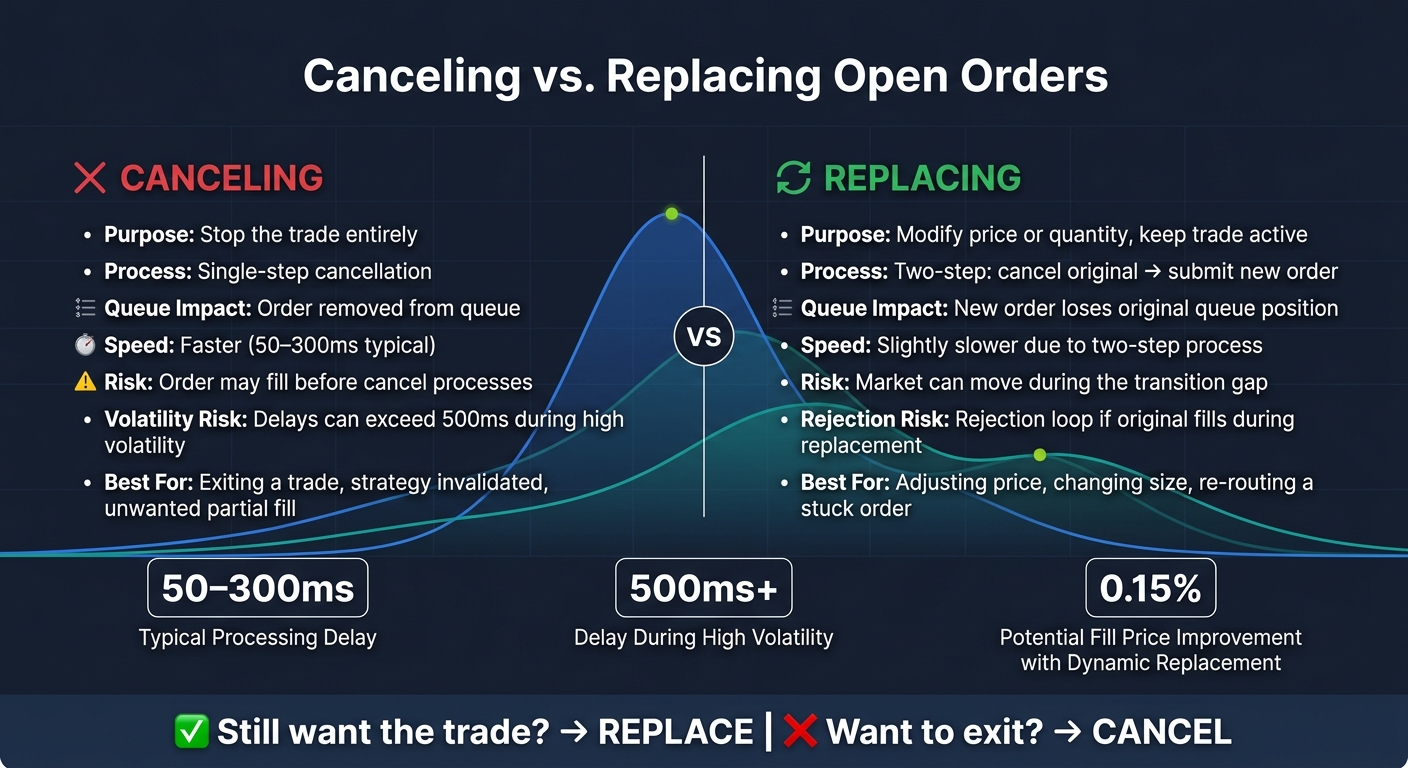
Canceling vs. Replacing Open Orders: Side-by-Side Comparison
What Are Open Orders?
An open order is an instruction you give to your broker to buy or sell an options contract that hasn't been executed yet. Once submitted, the order enters the exchange's queue, waiting for the price conditions you've set to be met - or until you decide to intervene.
Every open order follows a specific lifecycle. If the market hits your specified price, the order is filled, completing the trade. If you or your broker withdraws it before execution, it's canceled. And if the order's time limit runs out, it expires. For instance, a Day order expires at the end of the trading session, while a Good 'Til Canceled (GTC) order remains active until it hits the broker's maximum time limit. Understanding this lifecycle is crucial for deciding when to cancel or replace an order, which is a key part of managing your trades effectively.
Types of Open Orders
The type of order you place determines how you can cancel or replace it. A limit order specifies the exact price you're willing to accept - nothing more, nothing less. It only executes if the market reaches that price. On the other hand, a stop order stays inactive until the market hits your trigger price, at which point it becomes a market order. If you no longer want the stop order to execute, canceling it is usually your best option.
| Order Type | How It Works | Modification Approach |
|---|---|---|
| Limit Order | Executes only at your specified price or better | Often replaced to adjust to a changing market price |
| Stop Order | Converts to a market order when a trigger price is reached | Usually canceled when the exit condition is no longer needed |
| Stop Limit | Triggers a limit order at the stop price | Requires updating both the stop and limit prices for replacement |
| Trailing Stop | Adjusts the trigger price as the market moves | Can typically only be replaced with another trailing stop |
Knowing the type of order you've placed is the first step. The next step is understanding its current status to determine your options for modification.
Order Status and How It Affects Your Decision
An order's current status plays a big role in what you can do next. If the order is pending, you can cancel or replace it freely. For a partially filled order, only the unfilled portion can be canceled or modified, while the executed portion remains locked in your portfolio. In these cases, any changes you make will apply only to the remaining contracts or shares. If the order is fully executed, no further modifications are possible.
"Confirmation of a cancellation order does not necessarily mean the order has been cancelled, only that an attempt to cancel the order has been placed." - Fidelity.com Help
When you hit "Cancel", you're essentially sending a request to stop the order. However, if the trade gets executed before the cancellation is processed, the transaction will still go through. Always wait for confirmation that the order has been officially "Cancelled" before assuming it's inactive.
Canceling an Open Order: When and Why
Understanding when to cancel an open order is a key part of managing risk effectively. Sometimes, canceling an order entirely is the best way to avoid unintended market exposure, ensuring no leftover positions remain.
Reasons to Cancel an Order
One of the main reasons to cancel an order is a change in strategy. If the assumptions behind your trade no longer make sense - like updated earnings reports altering your view on a stock - there’s no reason to let the order stand. Canceling it ensures you won’t accidentally execute a trade that no longer aligns with your goals.
Volatility spikes are another common reason. When major economic news breaks or unexpected events hit the market, prices can move so quickly that even a well-placed order becomes risky. Canceling the order can help minimize the chance of an unfavorable fill. However, during periods of intense volatility, cancellations might take longer to process - sometimes exceeding 500 milliseconds - which leaves a brief window where the order could still execute.
Partial fills also present a unique situation. If only part of your order has been executed, you can cancel the remaining unfilled portion to avoid further exposure. This is referred to as canceling the "leaves" quantity. The shares or contracts already filled will remain in your portfolio, while the rest of the order is pulled from the queue.
Lastly, there are broker-initiated cancellations. Brokers may cancel orders automatically in cases where a limit price becomes unrealistic compared to current market conditions, or during events like stock halts, delistings, or corporate actions. While these cancellations are out of your control, being aware of them can help you avoid confusion if an order disappears without your input.
Best Practices for Canceling Orders
A critical tip: don’t assume an order is canceled the moment you hit the button. Always check your order status page and wait for a clear "Canceled" confirmation before considering the order inactive. If you submit a replacement order before receiving confirmation, you risk both orders executing - and you’ll be accountable for both trades.
Timing is also essential. For mutual fund orders, cancellation requests generally need to be submitted before the 4:00 p.m. ET market close to apply to that day’s pricing. For standard options orders during regular trading hours, act quickly once you decide to cancel. The longer you wait, the greater the risk that the market hits your price before the cancellation goes through.
Replacing an Open Order: When and Why
Replacing an open order, often referred to as a cancel/replace, involves tweaking an order's price or quantity while keeping your trading goal intact. Essentially, you're saying, "I still want this trade, but under slightly different terms." This approach requires the same precision and timing as canceling an order.
Most brokers handle cancel/replace requests as a two-step process. Sometimes, these steps are bundled together to reduce market exposure. The process mirrors what happens when you cancel an order, but with the intent to immediately submit a modified version.
Reasons to Replace an Order
Knowing when to replace an order ties closely to the strategies for canceling one.
One of the most common reasons to replace an order is price discovery - the process of finding the price at which a market maker will execute your trade. A good starting point is placing your limit order at the midpoint of the bid-ask spread. If it doesn’t fill after 15–30 seconds, you can adjust the price in small increments, like $0.01–$0.02, until the order fills or you hit your maximum price limit. This method, sometimes called gradual price adjustment, is more efficient than canceling and resubmitting the order repeatedly.
Another reason to replace an order is to adjust the quantity. For instance, if your position size changes - maybe you decide to reduce your exposure on a covered call - you can modify the number of contracts instead of canceling the order entirely. However, keep in mind that increasing the order quantity typically moves your order to the back of the queue at that price level, as the system treats it as a new submission.
How Replacing Differs from Canceling
The key difference lies in your intent. Canceling an order means you no longer want the trade, while replacing indicates you still want it but need to update the terms. While replacing avoids the full cancel-confirm-submit cycle, it introduces a brief delay that can matter in fast-moving markets. This delay, typically between 50–300 milliseconds, occurs because replacing involves canceling the original order and submitting a new one.
There’s also a risk of a rejection loop: if your original order fills just as your replacement request is processed, the modification is canceled, and your new order might not go through.
"A modification is implemented as a two-step process: 1. Cancellation - Your original order is cancelled and removed from the order book. 2. New Order Submission - A new order with the updated price is submitted and placed at the back of the queue." - Pomegra.io
To avoid unnecessary risks, set clear price limits before repeatedly adjusting an order. Constantly tweaking prices can chip away at your trading edge over time. By understanding these nuances, you can fine-tune your order management strategies to handle changing market conditions effectively.
sbb-itb-a9ac3c2
Canceling vs. Replacing: Key Differences
Building on earlier discussions, canceling and replacing orders differ fundamentally: one stops a trade entirely, while the other adjusts an open order to keep it active.
Comparison Table
Here’s a breakdown of the key differences between these two approaches:
| Factor | Canceling | Replacing (Cancel/Replace) |
|---|---|---|
| Primary Purpose | Completely stop the trade | Modify price or quantity while keeping the order active |
| Workflow | Simple cancellation process | Two-step process: cancel first, then submit a new order |
| Queue Priority | Order is removed from the queue | New order forfeits original queue position |
| Speed | Faster, as it only involves cancellation | Slightly slower due to the additional submission step |
| Main Risk | Order may fill before cancellation completes | Market could move during the gap when no order is active |
| Use Case | Exiting a trade or abandoning a strategy | Adjusting price, changing size, or re-routing a stuck order |
This table highlights when each method is most appropriate, helping traders make smarter decisions about managing their live orders.
How to Choose Between Canceling and Replacing
The choice between canceling and replacing depends heavily on your trading goals and the current market environment. The key question: do you still want to trade?
Canceling is the better option if market conditions have invalidated your strategy, if a partial fill has left you with unwanted exposure, or if heightened volatility increases the risk of your order executing before cancellation completes. In fast-moving markets, the risk of a "race condition" (where the order fills before it’s canceled) becomes more pronounced.
Replacing, on the other hand, is ideal when you’re still committed to the trade but need to adjust. For example, you might want to tweak the price to improve your chances of execution, change the order size, or address a stuck order. As trader Graham Lindman from ProsperityPub explains:
"If you place an order, everything looks fair but you're waiting a minute or two with no fill, hit cancel, replace and resend the order at the exact same price... [it] gives your order a fresh chance to reach a different exchange."
Keep in mind, increasing the quantity of a replacement order typically means losing your original queue position, while reducing it may allow you to retain priority. Both approaches involve brief delays, but replacing introduces an additional layer of risk due to its two-step nature, which can leave you exposed if the market shifts during the transition.
Common Order-Management Mistakes and How to Avoid Them
Mistakes to Watch For
Even seasoned traders can stumble when managing open orders, often due to the assumption that cancel-and-replace requests are instantaneous. In reality, under normal conditions, cancellations take anywhere from 50 to 300 milliseconds to process. During high-volatility periods, like earnings announcements or major economic updates, delays can stretch beyond 500 milliseconds. These lags increase the chance of unintended executions, creating a "race condition" where an order executes before the cancellation is processed.
Another frequent misstep is submitting a duplicate order before confirming the original order's cancellation. This can result in two active orders, leading to unexpected outcomes. As Fidelity cautions:
"Confirmation of a cancellation order does not necessarily mean the previous order has been canceled, only that an attempt to cancel the order has been placed."
Partial fills during a pending cancellation can also complicate matters, leaving traders with unintended positions and exposure.
Tips for Managing Open Orders Accurately
To sidestep these issues, it's crucial to adopt a disciplined approach to order management:
- Verify order status: Always check the status of an order before taking further action. A "Pending" status means the order is still active, while only a confirmed "Canceled" or "Replaced" status ensures it's safe to proceed.
- Use native cancel-and-replace features: If your broker offers a combined cancel-and-replace function, use it. This approach processes both actions as a single operation, minimizing the risk of exposure during the transition.
- Pause before resubmitting: Wait at least one second after canceling an order before submitting a new one. This pause reduces the likelihood of overlapping requests colliding within the matching engine.
Here are additional safeguards to enhance your routine:
- Set trade alerts for fills and cancellations to receive real-time updates, saving you from manually checking.
- Avoid rapid, repeated cancel attempts while the initial request is still pending. Excessive commands can trigger broker-imposed message-frequency limits, often capped at 100–500 cancellations per minute for retail accounts, potentially leading to rejected requests.
- Be aware of pre-market and after-hours limitations. Many brokers don't allow order modifications during these sessions, forcing you to cancel and resubmit manually. This increases the risk of missing out on liquidity.
The key takeaway? Treat every order action as a request, not a guarantee. Always confirm the updated status of your orders before making your next move. This habit can save you from costly mistakes and unnecessary stress.
Conclusion: Making Confident Order-Management Decisions
The key takeaway is simple: cancel if you want to exit completely, replace if you still want the trade but need better terms. The finer points - like queue priority, gap risk, and timing issues - follow from this basic choice.
It’s important to see each order action as a request rather than a guaranteed result. For instance, dynamic order replacement can improve fill prices by as much as 0.15% during volatile markets. On the flip side, a cancel arriving a few milliseconds too late or a replacement leaving a temporary gap can work against you.
These distinctions have a direct impact on your trading results. As trader Graham Lindman explains, canceling and replacing effectively repositions your order to secure a better exchange.
Approaching order management as an active process - rather than a simple, one-time action - can make all the difference. Always confirm your order status, leverage atomic cancel-and-replace tools when available, and account for the brief exposure period any modification creates.
If you’re trading options and want deeper insights into how your orders align with your portfolio, ThetaEdge (https://thetaedge.ai) offers tools to identify opportunities across covered calls, cash-secured puts, and multi-leg strategies. It also provides detailed risk and probability analysis to help you make informed decisions.
FAQs
Can my order still fill after I hit Cancel?
Yes, even after you hit cancel, an order can still be executed. Cancelation requests need time - usually between 50 and 300 milliseconds - to reach the exchange and be processed. During this brief window, market conditions can shift. If your order matches with a trade before the cancelation request is fully processed, the trade will go through. Think of cancelations as an attempt rather than an absolute guarantee.
Does a replace request lose my spot in the queue?
When it comes to modifying orders, the impact on your queue position depends on your trading platform and the type of adjustment you make. Some platforms allow you to keep your original spot in the queue for specific changes, while others treat any modification as a fresh order, resetting your position entirely.
Additionally, exchanges often have their own rules. For instance, reducing the size of your order might let you maintain your priority, but altering the price typically results in a new timestamp and a loss of your original place. It's always a good idea to review your platform's policies to understand how these changes are handled.
What should I do if my order is partially filled?
When an order is only partially filled, the shares that have been executed are finalized and cannot be altered. If you choose to cancel the remaining unfilled portion, that part of the order is removed from the order book. However, it’s worth noting that a few additional shares might still execute while your cancellation request is being processed. ThetaEdge streamlines this process by redirecting the remaining shares to the venue offering the best execution opportunities.