

FAQs on Modifying and Canceling Orders
When and how to cancel or modify pending stock and options orders, including timing limits, fees, platform quirks, and how to confirm changes.
When trading, quick adjustments can protect you from unfavorable outcomes. Here’s what you need to know:
- Canceling Orders: Only pending orders can be canceled. Once executed, they become binding contracts.
- Modifying Orders: Adjust price, quantity, or time-in-force, but only while the order is still pending. Some platforms treat modifications as new orders, resetting your queue position.
- Timing Restrictions: Exchanges like NASDAQ limit changes during specific times (e.g., 9:25–9:30 AM ET). Trading halts can also delay cancellations.
- Fees: Some brokers charge for modifications or cancellations, so check your platform's policies.
- Options Trading: Adjustments are trickier due to time decay and market conditions near expiration dates.
Always confirm changes before placing new orders to avoid duplicates. Use tools like order status trackers to verify if your updates were processed successfully.
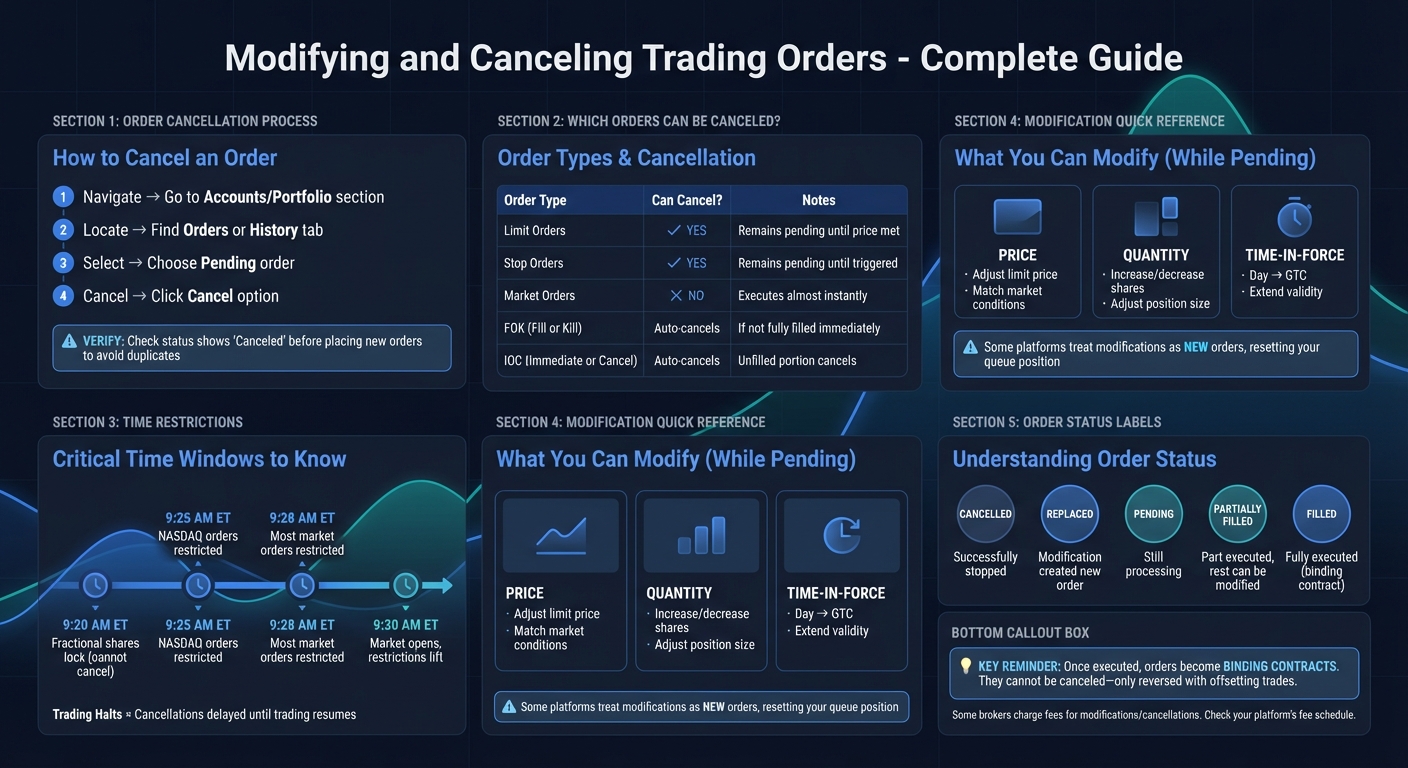
How to Cancel and Modify Trading Orders: Step-by-Step Guide
When and How to Cancel an Order
You can only cancel pending orders; once an order is executed, it becomes binding and requires an offsetting trade to reverse it.
Order Types That Can Be Canceled
Certain order types are easier to cancel than others. Limit and stop orders can be canceled as they remain pending until specific price conditions are met. On the other hand, market orders execute almost instantly and cannot be canceled once submitted. Special order types like Fill or Kill (FOK) automatically cancel if not fully filled immediately, while Immediate or Cancel (IOC) orders cancel any unfilled portion right away.
Time Windows for Cancellation
Timing is everything when it comes to canceling orders. Many trading centers restrict market order cancellations during specific windows, such as between 9:28 and 9:30 a.m. ET. For NASDAQ-listed orders, the restriction starts slightly earlier, from 9:25 to 9:30 a.m. ET. Additionally, fractional share orders may become locked from 9:20 to 9:30 a.m. ET, and cancellations during trading halts are delayed until trading resumes. Keep in mind that cancellation requests are processed on a "best efforts" basis, meaning there’s no guarantee the order will be stopped before execution.
How to Cancel an Order
Canceling an order is typically simple on most trading platforms. Go to the Accounts or Portfolio section, then find Orders or History. Look for the Pending section, select the order you want to cancel, and choose the Cancel option. Before placing a new order, double-check that the original order is marked as "Canceled" to avoid unintentional duplicate trades.
Next, let’s discuss how and when you can modify your orders.
sbb-itb-a9ac3c2
How to Modify Orders
Adjusting an order involves changing parameters like price, quantity, or time-in-force without canceling it outright. Many trading platforms allow you to tweak these settings while keeping the order active.
Modifying vs. Canceling an Order
The key difference between modifying and canceling lies in how the order is handled. Modifying a pending limit order usually lets you keep your original queue position. However, some platforms, like Robinhood, treat modifications as entirely new orders, which can reset your place in line.
When You Cannot Modify an Order
Orders can only be changed while they’re still pending or working. Once an order is fully or partially executed, it’s locked in and can no longer be adjusted. Certain order types, like Volume Weighted Average Price (VWAP) orders, are immediately processed by the system and don’t allow for changes. If an order has linked child orders, such as bracket or scale orders, switching the order’s side from Buy to Sell usually requires canceling the original. Additionally, during trading halts, modification requests are queued and won’t be processed until trading resumes.
Common Order Modifications
When adjustments are allowed, typical changes include:
- Limit price: Updating the price to better match market conditions.
- Quantity: Increasing or decreasing the number of shares or contracts.
- Time-in-force: Switching from "Day" to "Good 'til Canceled" (GTC) for extended order validity.
To modify an order, go to the "Orders" or "Pending" tab on your platform, select the order, and update the price or quantity fields as needed. After reviewing the changes, click "Update" or "Transmit" to send the revised order to the exchange. Some platforms, like Wealthsimple, don’t allow changes to quantity or time-in-force. In these cases, you’ll need to cancel the order and create a new one. If you make a mistake before confirming, you can usually use the "Discard Modifications" option to revert to the original order settings.
Next, we’ll explore how these principles apply to options orders.
Modifying and Canceling Options Orders
Options orders come with unique challenges compared to stock trades, primarily due to factors like time decay and gamma risk. While the basic process of modifying orders is similar, options trading introduces added layers of complexity, such as assignment risk and the influence of expiration dates. Let’s break down some key considerations, especially for covered-call orders and how expiration dates can affect your adjustments.
Managing Covered-Call Orders
Managing covered call risk requires careful attention because of their multi-leg setup and potential liquidity issues. For orders with multiple legs, you can adjust the price and quantity for any unfilled portions. However, liquidity - measured by bid-ask spreads, open interest, and volume - can significantly impact how easily these changes can be made.
Options with 30 to 45 days to expiration (DTE) are often viewed as optimal for balancing liquidity and time premium. However, as expiration approaches, options with low extrinsic value become more prone to early assignment, particularly around ex-dividend dates.
Tools like ThetaEdge's Roll Opportunities tool can assist in evaluating the financial impact of rolling or altering positions. It provides a clear breakdown of credit and debit scenarios when rolling up, down, or out to a later expiration date. Additionally, the Portfolio Greeks Calculator helps traders understand how changes to a position affect their overall exposure to Delta, Gamma, Theta, and Vega.
How Expiration Dates Affect Order Changes
As options near their expiration, their value declines rapidly, making last-minute adjustments riskier. Theta (time decay) accelerates significantly in the final 30 days, and an at-the-money call option can lose all of its extrinsic value within just two weeks. This rapid decline leaves little room for error when making adjustments close to expiration.
At the same time, Gamma risk climbs sharply, making Delta highly sensitive to even small price changes in the underlying stock. In fact, Gamma near expiration can be more than five times higher than it was two months earlier. For covered-call sellers, this heightened volatility can quickly turn a winning trade into a losing one.
Given these challenges, timely adjustments are essential. If you find yourself needing to modify or cancel an order during the final week before expiration, consider rolling the position to a later date. This can provide more time for effective trade management and help mitigate the effects of accelerated time decay and increased Gamma risk.
Confirming Your Changes Went Through
A confirmation simply acknowledges receipt of your request - it doesn’t guarantee the change has been completed. As Fidelity explains, "Confirmation of a cancellation order does not necessarily mean the order has been cancelled, only that an attempt to cancel the order has been placed".
How to Check Your Order Status
To confirm your order’s status, navigate to the Order Status or Activity & Orders section of your trading platform. Be sure to manually refresh the page to get the latest updates. Look for these status labels:
- Cancelled: The order has been successfully stopped.
- Replaced: Your modification resulted in a new order being created.
- Filled or Partially Filled: The order (or part of it) was executed before your change request reached the market. If partially filled, only the remaining portion can still be adjusted or canceled.
- Pending: Your request is still being processed by the exchange. Wait a moment and refresh the page again.
If the status doesn’t reflect your intended changes, follow the steps below to resolve the issue. Understanding dynamic exit strategies can help you manage these situations more effectively.
What to Do If a Change Fails
If your change request fails, check the Filled section to see if the trade was executed before your request was processed. This will clarify whether the order was completed.
Avoid placing a replacement order until the status explicitly shows Cancelled. Doing so prematurely could result in both orders being executed, which may not align with your intentions.
Key Points to Remember
Check your order status carefully before making any changes. Modifications or cancellations can only be made while an order is still pending or open. Once a trade is executed, it becomes a binding agreement that cannot be undone. Use your platform's dashboard to confirm the status of your order, and always wait for confirmation of any changes before placing a new order. Acting too quickly and submitting a replacement order without verification could result in both orders being executed, which might unintentionally double your position. Taking these steps ensures you manage your orders safely and effectively.
Be mindful of market timing rules when trading. For fractional shares, make sure to cancel orders before 9:20 AM ET to avoid pre-market restrictions. Keep in mind that trading halts can also delay the processing of cancellations.
Effective tools and strategies are essential for managing risk, particularly when dealing with covered-call positions. Platforms like ThetaEdge offer features such as Portfolio Greeks calculators, which help evaluate key risk metrics like Delta, Gamma, Theta, and Vega. They also provide rolling guidelines that factor in variables like implied volatility, fees, and slippage, helping you steer clear of last-minute adjustments during periods of heightened risk.
Be aware of modification and cancellation fees. While some brokers charge fees for these actions, execution credits from completed trades on the same day often help offset these costs.
FAQs
What happens if my cancel request is submitted but the order still fills?
If you submit a request to cancel an order but it still gets filled, this means the order was executed before the cancellation could process. Once an order is filled, it’s final and cannot be reversed.
Will modifying a pending order reset my queue position?
When you modify a pending order, your place in the queue typically stays the same. However, if you change critical details such as the price or quantity, you might lose your original position. It's important to consider this risk before making adjustments to avoid any surprises.
How should I handle covered-call changes in the last week before expiration?
In the last week before expiration, it’s worth evaluating whether to close or roll your covered call, particularly if the stock price is near or above the strike price. This period is also an opportunity to review market conditions and make any necessary adjustments to ensure your position aligns with your overall investment goals.